

The Need for Speed: Apps That Actually Help You Read Faster
We’re all reading more than we used to—work reports, newsletters, research papers, articles we save for “later,” and books that keep piling up beside the bed. The problem isn’t access to information. It’s finding enough time to get through it.
So people try speed reading. Usually, it lasts a few days before frustration kicks in.
The same obstacles show up again and again: that little voice in your head sounding out every word, or your eyes drifting backward because you’re convinced you missed something. One sentence becomes two reads. Two become five. Before long, any speed gains disappear.
That’s where most speed-reading advice misses the point. Reading faster isn’t simply about turning pages at a higher rate. It’s a trainable skill—part visual, part cognitive. Your eyes need to learn how to move differently, and your brain has to get comfortable processing ideas in larger chunks instead of word by word.
Naturally, that raises a question: which apps actually help train those skills, and which ones are just wrapping buzzwords around flashy animations?
To find out, we put leading mobile apps through three practical tests: Can they genuinely train eye movement? Can they handle the kinds of material people read every day? And perhaps most importantly—do they help you remember what you just read?
Here’s what stood out.
Outread
Available on: iPhone, iPad
Pricing: Free version available / Premium from $4.99
What It Feels Like in Practice
Outread doesn’t try to turn reading into a game. No streaks. No spinning rewards wheel. It focuses on one thing: helping you move through real text more efficiently.
Its most useful feature is Guided Reading Mode. Instead of isolating single words in a flashing box, Outread keeps the entire page visible and moves a highlighted guide smoothly through the text at your chosen reading speed.
That small detail matters more than you’d think.
Many readers constantly backtrack without realizing it. Eyes drift upward, reread a phrase, then repeat the cycle. Outread quietly interrupts that habit by nudging your attention forward. Not forcefully—just enough to keep momentum going.
What Works
· Excellent import support. You can pull in web articles directly from Safari, paste links, or upload DRM-free ePubs, PDFs, and Word files.
· You never lose visual context. Paragraph structure, punctuation, and page flow all stay intact.
Where It Falls Short
· Android users are out of luck.
· It behaves more like a reading assistant than a training course. If you want dedicated drills for peripheral vision or eye exercises, you'll need something else.
Spreeder
Available on: iOS
Pricing: Free version / Premium plans available
What It Feels Like in Practice
Spreeder takes a completely different approach.
It relies on Rapid Serial Visual Presentation—RSVP for short—which streams words one after another directly into the center of your screen. Fast. Sometimes very fast.
The theory is simple: if words appear quickly enough, your inner narration can’t keep up. You stop mentally pronouncing every sentence and begin processing visually instead.
And yes—it can work.
The app gives you an impressive amount of control. Reading speed, word grouping, spacing, fonts, display settings—nearly everything can be adjusted.
But there’s a trade-off.
Staring at words flashing endlessly in one fixed location can start feeling less like reading and more like a reaction test. After a long session, your eyes may remind you of that.
What Works
· Deep customization for people who like fine-tuning every setting.
· Broad file support with a large personal content library.
Where It Falls Short
· Long sessions can become tiring surprisingly quickly.
· Dense material—technical reports, complex arguments, fiction with layered storytelling—often loses its rhythm in one-word bursts.
Sometimes context matters more than raw speed.
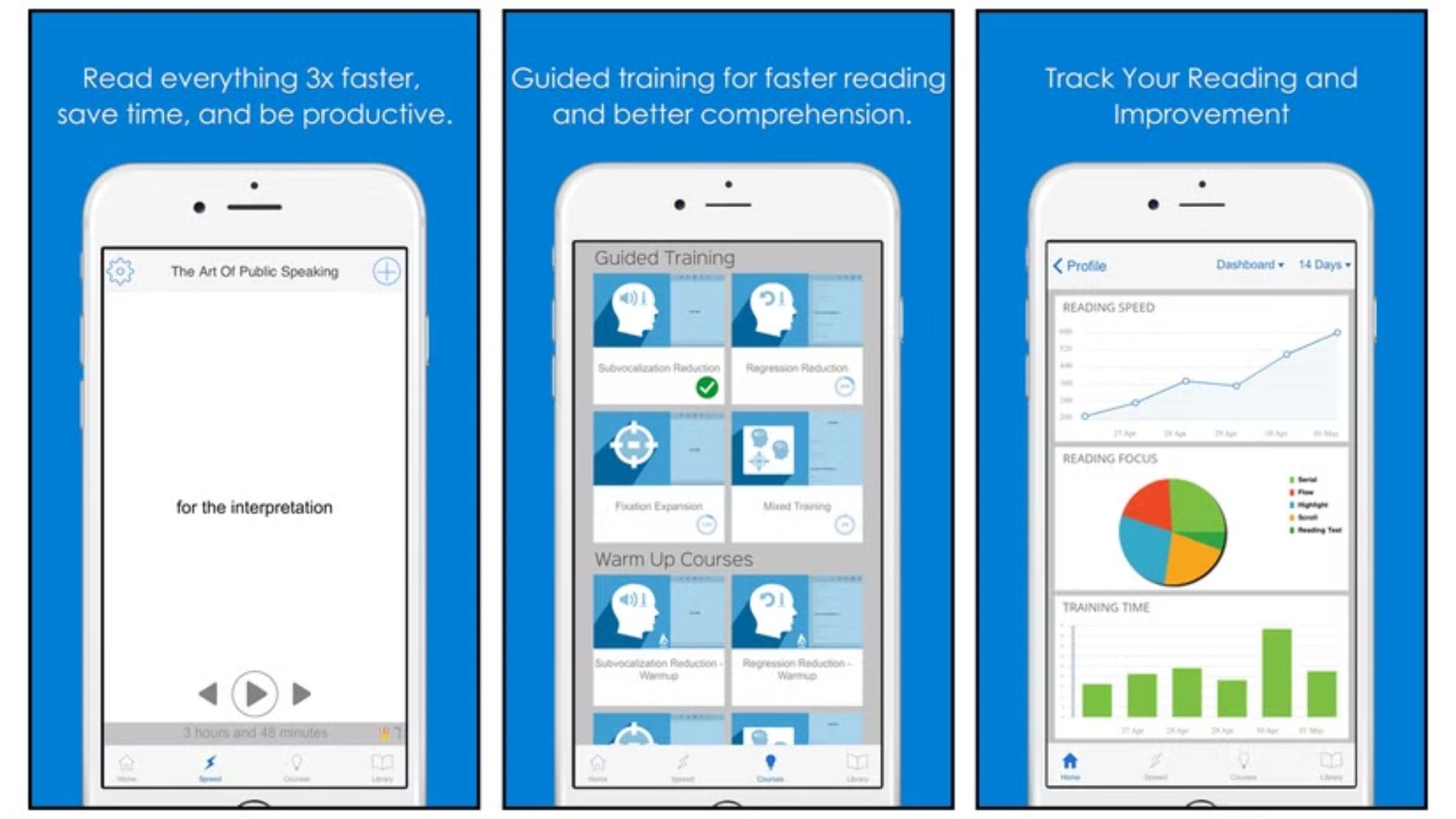
Speed Reading — brain training
Available on: Android
Pricing: Free with ads / Premium purchases available
What It Feels Like in Practice
If your goal is actual eye training—not just reading faster text displays—this one gets interesting.
Its strongest feature revolves around Schulte Tables: grids filled with scattered numbers or letters. The challenge sounds simple. Keep your eyes fixed in the center and identify items using only peripheral vision.
Simple on paper. Weirdly difficult in practice.
The exercise pushes your eyes to expand how much information they can capture without constantly jumping around the page. Over time, that wider field of view can make reading feel smoother because your eyes stop making as many tiny movements.
What Works
· Strong emphasis on visual exercises and concentration training.
· Includes a text reader for practicing with real material.
Where It Falls Short
· The interface feels several design generations behind.
· Ads in the free version show up often enough to break concentration.
And some premium features sit behind progression systems that feel more frustrating than motivating.
Reading Trainer
Available on: iOS
Pricing: One-time purchase (~$2.99–$4.99 depending on region)
What It Feels Like in Practice
Reading Trainer feels less like an app and more like a workout session for your eyes.
Instead of asking you to casually read passages, it throws you into fast-paced visual exercises: tracking moving targets, spotting matching patterns, reacting under time pressure. A few minutes in, it starts feeling oddly competitive.
The idea is to train your eyes away from fixating on individual letters and toward recognizing larger visual patterns and word groups.
And unlike many apps in this category, it actually checks whether you're understanding anything.
Because reading 600 words per minute sounds impressive—until someone asks what you just read.
What Works
· One purchase unlocks everything. No recurring subscription fatigue.
· Includes comprehension testing rather than rewarding pure speed.
Where It Falls Short
· The interface still carries some old-school design habits.
· Built-in reading material can feel a little dry.
Functional? Yes. Exciting? Not always.
So Which One Is Worth Using?
For most people trying to read everyday material faster—not practice drills for the sake of drills—Outread ends up being the easiest recommendation.
Apps like Speed Reading — brain training and Reading Trainer do a solid job training isolated skills. They can sharpen eye movement and improve focus. But there’s often a gap between mastering exercises and getting through a dense 4,000-word industry report on a Tuesday afternoon.
Spreeder sits at the opposite extreme. It pushes speed aggressively, though sometimes at the expense of comfort and comprehension.
Outread lands somewhere in the middle, and that balance matters.
Rather than changing reading into a game or forcing extreme techniques, it targets one of the habits that quietly slows many people down: looking backward. Then it applies that training directly to the articles, documents, and pages you're already trying to finish.
In other words, your reading list becomes the practice session.
And if you were going to read all that material anyway, that’s a pretty efficient place to start.