

Smart Digital Training Grounds: The Safest Apps for Introducing Teenagers to Debit Cards and Financial Literacy in 2026
Handing a teenager a piece of plastic and hoping for the best is a recipe for a very expensive lesson. For years, parents were caught in a tough spot: standard checking accounts offered zero guardrails, while traditional cash allowances left zero paper trails.

When we tested the latest crop of fintech tools on the road this year, we were looking for the sweet spot between ultimate parental peace of mind and genuine economic independence for teens. A great banking app should be a digital training ground, complete with automated chores, real-time tracking, and structured financial literacy modules.
After downloading, funding, and testing the primary options on the market, we evaluated them based on app stability, real-world spending controls, educational depth, and overall value. The following options represent the absolute safest and most effective ways to introduce teenagers to modern money management.
Greenlight
Availability: App Store and Google Play
Pricing: Tiered subscriptions starting at $5.99/month (Covers up to 5 kids)
When we set up our test account with Greenlight, it became immediately obvious why this app dominates the space. It isn't just a prepaid debit card; it’s an entire ecosystem that replicates real-world banking under a massive safety net. The interface is cleverly split into distinct parent and child dashboards, keeping both parties on the same page.
The Reality Check
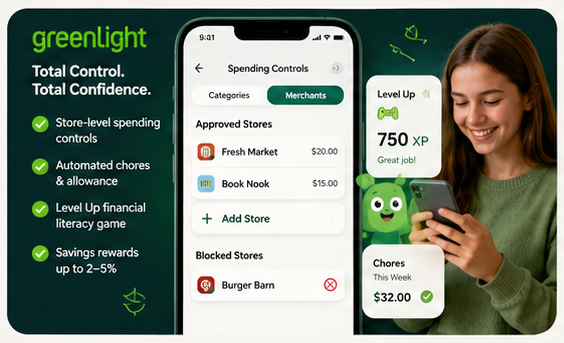
The standout feature that actually works flawlessly is Greenlight's granular, store-level spending controls. While most competitor apps only let you turn off broad categories like "online shopping," Greenlight lets you approve specific merchants. For instance, you can explicitly authorize $20 at a specific local grocery store while blocking the fast-food joint next door.
Furthermore, their Level Up in-app financial literacy game successfully gamifies complex topics. The bite-sized challenges are mapped to national K-12 financial standards, keeping teens engaged via structural rewards rather than stale, textbook-style quizzes.
Pros & Cons
* Pros: Highly specific store-level restrictions; exceptional automated chore and allowance tracking; includes robust savings incentives (up to 2-5% savings rewards depending on your plan tier); covers up to five children under one flat monthly subscription.
* Cons: No free tier; replacing a lost physical card triggers a $5.99 fee; higher-tier plans with investing tools climb up to $15.98–$19.98/month.
Step
Availability: App Store and Google Play
Pricing: Free ($0/month with no hidden overdraft fees)
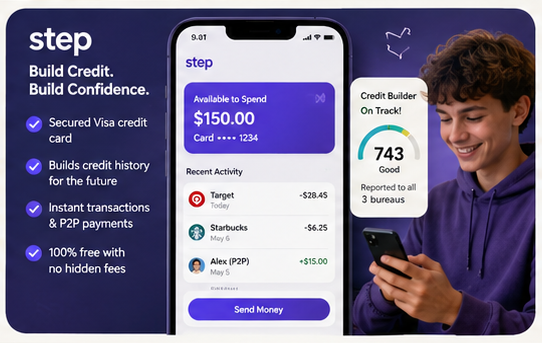
Step takes a fundamentally different operational approach by using a secured Visa credit card rather than a standard prepaid debit card. Don't let the word "credit" scare you off—teens can only spend the exact amount of money loaded onto the card by their parents, making it functionally impossible to overdraw the account or rack up debt.
The Reality Check
The absolute best part of using Step is its passive credit-building mechanism. Because it runs on a secured credit framework, Step automatically reports positive, on-time payment history to the three major credit bureaus once your teen turns 18. When we evaluated the spending side, transactions processed instantly, and the peer-to-peer sending feature felt as seamless as Venmo, which is exactly what appeals to older teenagers.
Pros & Cons
* Pros: Completely free with no monthly subscription costs; helps safely build a credit history before adulthood; highly intuitive user interface tailored heavily to older teens.
* Cons: Parental controls are significantly less customizable than Greenlight; lacks deep, store-specific merchant blocking; financial literacy features are self-directed rather than deeply structured.
Acorns Early (Formerly GoHenry)
Availability: App Store and Google Play
Pricing: $5.00/month per child
Recently absorbed under the broader Acorns umbrella, Acorns Early retains the vibrant, highly instructional DNA of the original GoHenry platform. This app leans heavily into the absolute basics of money management, making it an excellent choice for younger teens or total beginners to the concept of digital banking.
The Reality Check
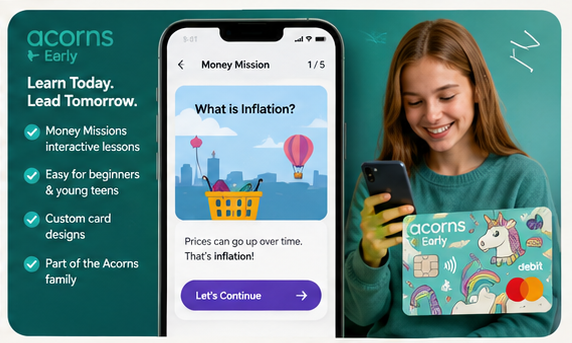
The feature that truly excels here is the Money Missions module. These are highly structured, interactive storytelling lessons built directly into the core app layout. Rather than just tracking spending, the app forces teens to actively participate in short, animated modules covering everything from inflation to compound interest to unlock new spending privileges.
Pros & Cons
* Pros: The most intuitive and engaging educational curriculum on the market; great customized physical card designs; seamless integration into the broader Acorns family ecosystem.
* Cons: Expensive for multi-child families as pricing is $5.00 per child; parental dashboard lacks advanced automated category restrictions; does not pay native interest on savings balances.
The Final Verdict
If you are looking for a completely free, frictionless path to get your older teenager comfortable with plastic while quietly preparing them for their first adult auto loan or apartment application, Step is a magnificent, zero-cost utility.
However, if your primary goal is absolute safety, comprehensive education, and total parental control, Greenlight remains the undisputed heavyweight champion.
While the $5.59/month base fee might initially cause hesitation, the ability to control exactly which physical stores your teen can spend money at—combined with their automated chore-to-allowance engine and standard-setting Level Up curriculum—makes it the safest, most comprehensive digital training ground on the market. It effectively transforms potentially stressful financial mistakes into completely safe, highly constructive teachable moments.