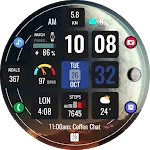
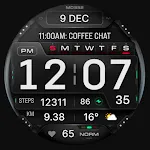
 MD332 Digital watch face
4.6

![[KNA006] THE NIGHT icon](https://static.amplo.cc/st_icon_file/b80108d2d37278fae1737079faab6c11.webp)
Art & Design
Ratings
Downloads
Age
Advertisement
![[KNA006] THE NIGHT screenshot 1](https://static.amplo.cc/st_screenshot_file/9a4806c4fa836091f2238299c00d34f5.webp)
![[KNA006] THE NIGHT screenshot 2](https://static.amplo.cc/st_screenshot_file/7041624755e673c4922c7197c3d94ca0.webp)
![[KNA006] THE NIGHT screenshot 3](https://static.amplo.cc/st_screenshot_file/74e9399b70b1abc64292ebdae0dfdc16.webp)
![[KNA006] THE NIGHT screenshot 4](https://static.amplo.cc/st_screenshot_file/64717cb96c9bd6a12263eccabd07ee77.webp)
![[KNA006] THE NIGHT screenshot 5](https://static.amplo.cc/st_screenshot_file/27b221932fbd60375c5f1de937c54ecc.webp)
![[KNA006] THE NIGHT screenshot 6](https://static.amplo.cc/st_screenshot_file/a4054a28f1519ac5bc380699dd603751.webp)
![[KNA006] THE NIGHT screenshot 7](https://static.amplo.cc/st_screenshot_file/94e131e28a1288a9ea67e4b07a3808f4.webp)
![[KNA006] THE NIGHT screenshot 8](https://static.amplo.cc/st_screenshot_file/1fb949f9a2a47d15242a6f4c0560645a.webp)
![[KNA006] THE NIGHT screenshot 9](https://static.amplo.cc/st_screenshot_file/78672900d674af02607e91a92451626e.webp)
![[KNA006] THE NIGHT screenshot 17](https://static.amplo.cc/st_screenshot_file/66364cdd2d254f2d109cb7cf0ee0198c.webp)
![[KNA006] THE NIGHT screenshot 33](https://static.amplo.cc/st_screenshot_file/ac799b81c862fc1601856c1f0773126d.webp)
![[KNA006] THE NIGHT screenshot 34](https://static.amplo.cc/st_screenshot_file/d0f617ac07bd754772003d2d3772cfd9.webp)
![[KNA006] THE NIGHT screenshot 35](https://static.amplo.cc/st_screenshot_file/c15b9b390c5dcda19e620a038f73d526.webp)
![[KNA006] THE NIGHT screenshot 36](https://static.amplo.cc/st_screenshot_file/da0a8cc009b544a0c1af056a077798f9.webp)
![[KNA006] THE NIGHT screenshot 37](https://static.amplo.cc/st_screenshot_file/7f0f1fdd64a95afe8aafdf4f9aa86a7a.webp)
![[KNA006] THE NIGHT screenshot 38](https://static.amplo.cc/st_screenshot_file/fc448849c441207b0b21a9d54be81de5.webp)
Advertisement
Name
Category
Price
Safety
Developer
Version
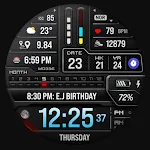
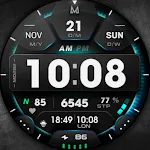
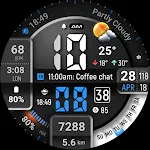
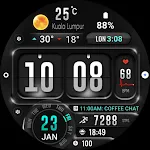
Wear Os Watch Face With Customizable Complications
WATCH FACE INSTALLATION NOTES:
(Please update your android to lastest version)
Note : install Watch face via Wear OS Watch
(If you cannot install via your smartphone)
https://drive.google.com/file/d/1Ks0k68vwTua4eLPvMryORga0ZwViglWk/view?usp=drivesdk
Check your watch’s compatibility with WEAR OS before proceeding with the installation. (Note: Galaxy Watch 3 and Galaxy Active are not WEAR OS devices.)
✅ Compatible devices include API level 30+ Google Pixel, Galaxy Watch 4, 5, 6, and other Wear OS models.
🚨 Watch faces don’t automatically apply on your watch screen after the installation. That’s why you MUST set it on your watch’s screen.
Features:
- Digital Styles ( 12/24 hour time format )
- Date , Day of week , Month , Year
- 3 Editable Complication
- 2 Editable App shortcut
- 5 Colors 5 Styles
- Steps Count , Distance calculate KM., Heart Rate , Battery Level , Moon Phase , unread message count , Next event , Calories calculate , Sunrise and Sunset time ,
Customization:
1. Touch and Hold Display
2. Tap on Customize Option
Complications:
You can customize with the any data you want.
For example , you can select weather , world clock , sunset/sunrise , barometer etc.
**Some features may not be available on some watches.
For further support, please contact: [email protected]
Thank you for Your support.
Advertisement