 Nutrilio: Food Tracker, Macros
4.4


Health & Fitness
Ratings
Downloads
Age
Advertisement
Advertisement
Name
Category
Price
Safety
Developer
Version
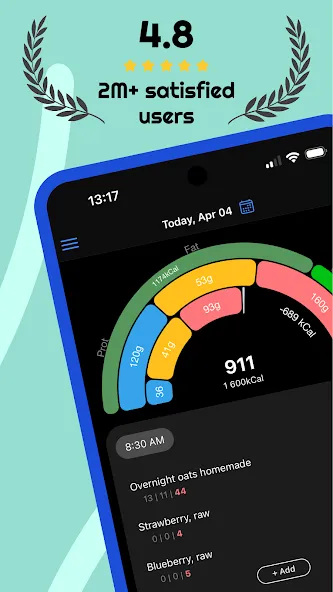
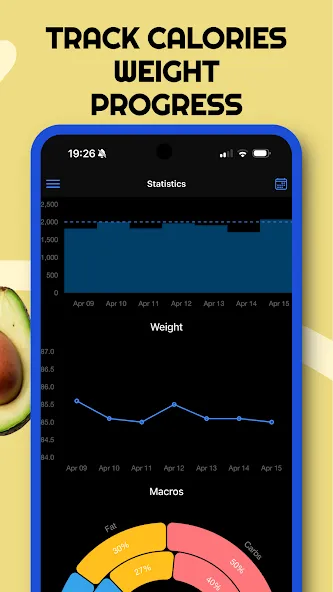
Track your progress toward nutrition, macros, water, fitness, and weight loss goals. EatFit is more than just a calorie or food tracker and health app. Besides counting calories, you can plan meals for the next day or a week. You will stay as close as possible to your calories, macros, and nutrition. Want to know how many grams of protein, fat, and carbohydrates per kg of weight you eat (g/kg)? The app can calculate that. Grams per lb (g/lb)? No problem.
EatFit is not another app about teaching you what to eat. Eat what you want. The app will help you adjust the amount of food so that you fit in your planned macros, calories, and other goals.
As a nutrition tracker, EatFit will tell you how to fit in your macros. Macros proportion is almost as important as total calorie intake.
As a water tracker, it will help you to drink enough water and remind you when it is time to sip some water.
Got 500 calories left at the end of the day? Add some food and see how much of it you should consume.
Here is a closer look at the features and benefits:
* Distribution of food by weight - You add food, and the app tells you how much of it to consume
* Calorie Tracker - Know how many calories you ate
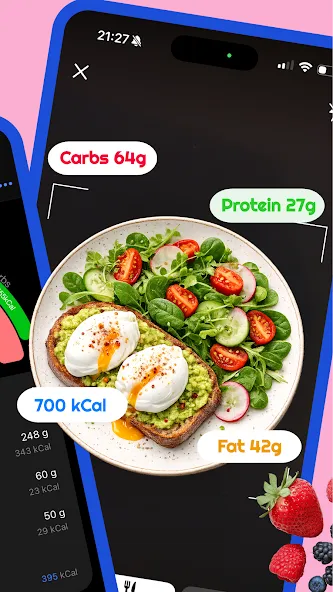
* Macro Tracker - See how much protein, fat, and carbohydrates you consumed
* Fast and Easy Food Tracker Tools - Foods from history, type to search, add from favorites
* Meal planner - Create a meal plan for tomorrow or any other day
* Bar Code Scanner - Scan and add foods using your phone’s camera
* Weight Tracker - Log your everyday weight. See stats and how fast you approach your goals
* Water Tracker - Track water and get notified when it is time to drink some
* Copy plan - Most people eat the same food from day to day. Copy-pasting will make calorie tracking even easier
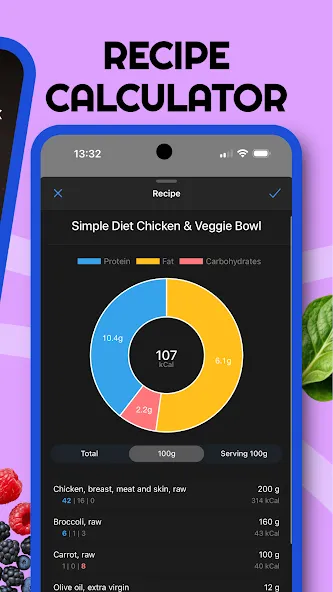
* Add Your Own Foods/Recipe Tracker - Save recipes and take weight after cooking into account
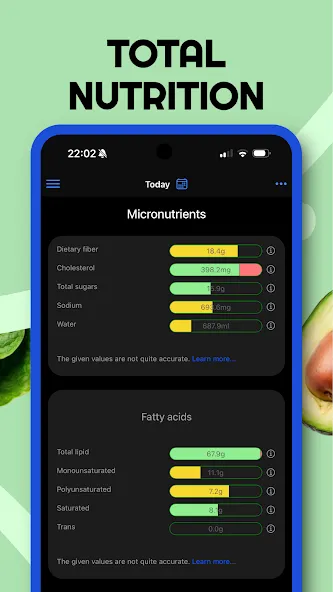
* Analyze Nutrition and Macros - See how many calories and nutrients you ate per any time period
How many times have you tried to stay accurate about your nutrition? And here again, it is 6 p.m. you are hungry, all of the calories you planned for the day are eaten, and even worse - you are 50g of protein undereaten.
That is what happens when you track calories after you’ve eaten them.
But what if you’ve planned your meals ahead? How to stay accurate with macros?
The answer is PLANNING AHEAD!
For example:
You need 2000 calories, 30% of calories from protein, 30% from fat, and 40% from carbs.
Got chicken breasts, oats, rice, eggs, bread, and avocado in the fridge.
How much of each food should you consume to meet the macro goals?
The app will show you.
Just add all the food you plan to eat for the day and it will be distributed by weight.
Perfect for almost any diet!
Want a keto? Set your goal to low carb and you’re all set! You don’t have to use a separate app specifically for tracking carbohydrates or following a keto diet.
What differs EatFit Calorie Counter from any other calorie tracker app:
1. Calorie tracker with distribution
* Distribution of your food by weight
* Easy-to-use calorie tracker
* % of proteins, fats, carbs
* g/kg, g/lb of proteins, fats, or carbs
* Built-in barcode scanner
2. Meal planner, also with distribution
* No limit to the number of your meals
* Equal distribution of food between meals
* Manual adjustment
3. Recipe calculator
* Takes into account weight after cooking
* Configure servings
EatFit is free to download and use. I constantly improve the app and hope you’ll love it.
Google Play
APP STORE
Advertisement
Taptostore.com is an independent app discovery and editorial review platform. We publish reviews, comparisons, and recommendations designed to help users explore apps and make informed choices.
Download links on Taptostore.com direct users to the relevant official app store or another distribution channel designated by the developer or publisher. App downloads and installations take place through those external platforms.
Our content is developed through product research, editorial analysis, publicly available information, and, where appropriate, an assessment of the app’s features and user experience. Reviews and recommendations represent our editorial judgment at the time of publication.
The security and privacy practices of each app are determined by its developer. Before installing an app, users should review its official store listing, developer information, requested permissions, privacy policy, update history, and recent user feedback.
Taptostore.com does not control or independently certify third-party apps and cannot guarantee their security, reliability, performance, or privacy practices.
Not necessarily. Apps may be free, paid, advertising-supported, or include in-app purchases and recurring subscriptions. Pricing and availability may vary by region, device, platform, and time. Please refer to the relevant official store listing for current terms.
Availability may be affected by geographic restrictions, device compatibility, operating-system requirements, age limitations, store policies, or decisions made by the developer or publisher. These factors are outside the control of Taptostore.com.
Taptostore.com does not operate the apps featured on the website and cannot access their accounts or internal systems. Questions about login credentials, account recovery, technical issues, data deletion, or app functionality should be directed to the relevant developer through its official support channels.
Please do not send passwords, verification codes, recovery credentials, or payment information to Taptostore.com.
App-related payments, subscriptions, cancellations, and refunds are administered by the app store, developer, or payment provider responsible for the transaction. Taptostore.com does not process these transactions and cannot manage subscriptions or issue refunds.
Uninstalling an app may not cancel an active subscription. Users should manage subscriptions through the platform on which the purchase was made.
We make reasonable efforts to publish accurate and useful information. However, app features, pricing, compatibility, availability, and policies may change without notice. For the most current details, users should consult the relevant official store listing or developer documentation.
Unless expressly stated, Taptostore.com is not affiliated with, sponsored by, endorsed by, or officially connected with the developers, publishers, brands, or platforms featured on the website.
Product names, logos, brands, and trademarks belong to their respective owners and are referenced solely for identification and informational purposes.
Advertisement