 UpStudy - Camera Math Solver
4.5


Education
Ratings
Downloads
Age
Advertisement
Advertisement
Name
Category
Price
Safety
Developer
Version
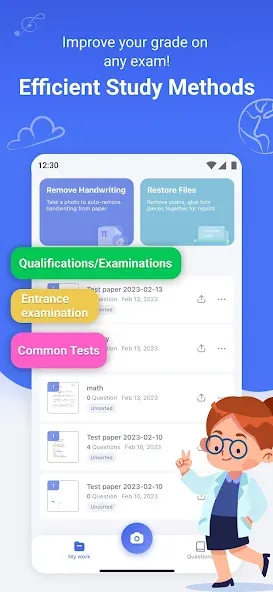
A superb application to organize test papers, wrong questions, and homework!
It helps you study more efficiently and prepare for exams with ease.
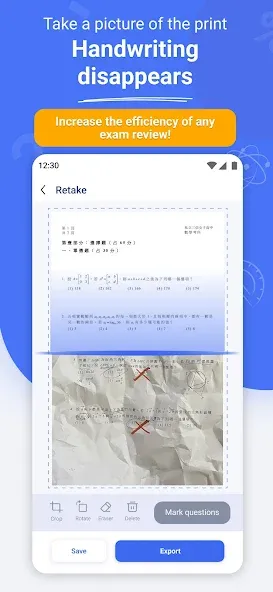
・Take a picture of your homework and test papers: automatically erases your handwriting and restores it to the way it was before you wrote it.
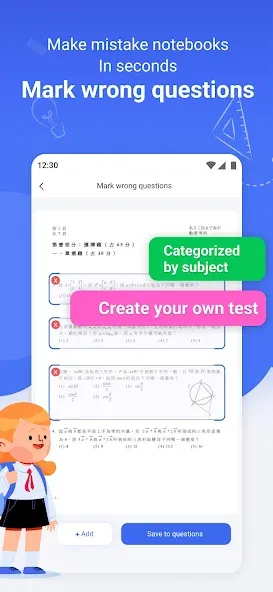
・You can take a picture of the wrong questions: organize the wrong questions efficiently and focus on them.
■Main Features
◆Automatic handwriting removal
・Scan test papers, homework, quiz, and textbooks with a single click.
・The scanner automatically identifies the edges of test papers and corrects them intelligently.
・Automatic handwriting and graphics removal to restore the pre-written state with high accuracy.
◆Revise wrong answers, equations, and formulas
・Scan test papers and assignments to automatically erase wrong answers.
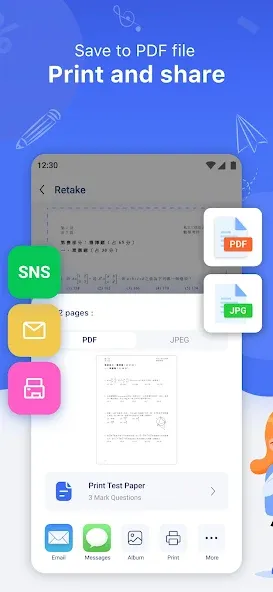
・Scan incorrect questions and create your own question bank in PDF that can be printed and practiced at any time.
・Organize test questions by subject to effectively review and prepare for exams.
◆Save, Export, Print
・Generate PDFs, images, and Word files in HD for printing and practicing without hurting your eyes.
・Connect directly to a printer and print and practice again anytime.
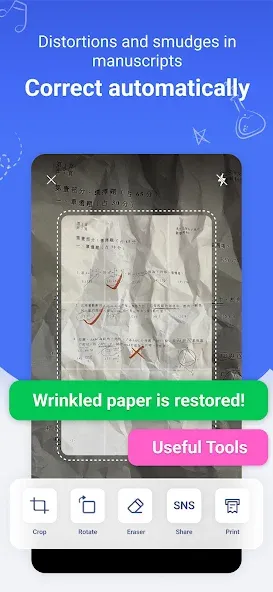
◆Automatic correction and restoration of manuscripts
・Crumpled paper can be scanned to print a new clean sheet.
・Even if paper is wet or damaged, the scanner can perform automatic restoration by scanning.
◆Organize and share
・Problems can be categorized by subject, quickly organized and sorted, and files can be easily searched.
・Share with classmates and friends with a single click.
■Recommended for situations like these!
・If you lose your homework, you can easily get it back by scanning a photo.
・You have a lot of wrong questions, and handwriting is easy to make mistakes and hard to organize? You can scan and categorize and organize wrong questions and make your own mistake notebook.
・Can’t use your handwritten paper repeatedly when preparing for an exam? Simply scan it and return it to its pre-writing state!
Download “Homework Scanner: Remove Notes” now to free yourself from the stress of studying and make exam preparation easier.
Terms of Use:
https://app-service.homeworkhelperai.com/static/user_agreement.html
Privacy Policy:
https://app-service.homeworkhelperai.com/static/privacy_policy.html
Contact us:
[email protected]
Google Play
APP STORE
Advertisement
Taptostore.com is an independent app discovery and editorial review platform. We publish reviews, comparisons, and recommendations designed to help users explore apps and make informed choices.
Download links on Taptostore.com direct users to the relevant official app store or another distribution channel designated by the developer or publisher. App downloads and installations take place through those external platforms.
Our content is developed through product research, editorial analysis, publicly available information, and, where appropriate, an assessment of the app’s features and user experience. Reviews and recommendations represent our editorial judgment at the time of publication.
The security and privacy practices of each app are determined by its developer. Before installing an app, users should review its official store listing, developer information, requested permissions, privacy policy, update history, and recent user feedback.
Taptostore.com does not control or independently certify third-party apps and cannot guarantee their security, reliability, performance, or privacy practices.
Not necessarily. Apps may be free, paid, advertising-supported, or include in-app purchases and recurring subscriptions. Pricing and availability may vary by region, device, platform, and time. Please refer to the relevant official store listing for current terms.
Availability may be affected by geographic restrictions, device compatibility, operating-system requirements, age limitations, store policies, or decisions made by the developer or publisher. These factors are outside the control of Taptostore.com.
Taptostore.com does not operate the apps featured on the website and cannot access their accounts or internal systems. Questions about login credentials, account recovery, technical issues, data deletion, or app functionality should be directed to the relevant developer through its official support channels.
Please do not send passwords, verification codes, recovery credentials, or payment information to Taptostore.com.
App-related payments, subscriptions, cancellations, and refunds are administered by the app store, developer, or payment provider responsible for the transaction. Taptostore.com does not process these transactions and cannot manage subscriptions or issue refunds.
Uninstalling an app may not cancel an active subscription. Users should manage subscriptions through the platform on which the purchase was made.
We make reasonable efforts to publish accurate and useful information. However, app features, pricing, compatibility, availability, and policies may change without notice. For the most current details, users should consult the relevant official store listing or developer documentation.
Unless expressly stated, Taptostore.com is not affiliated with, sponsored by, endorsed by, or officially connected with the developers, publishers, brands, or platforms featured on the website.
Product names, logos, brands, and trademarks belong to their respective owners and are referenced solely for identification and informational purposes.
Advertisement