


 MessengerCommunication
4.7


Productivity
Ratings
Downloads
Age
Advertisement
Advertisement
Name
Category
Price
Safety
Developer
Version
Drop the keyboard. Sign on the spot.
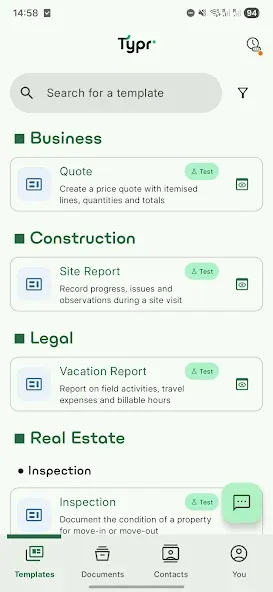
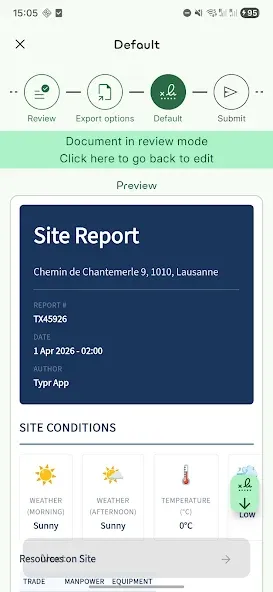
Typr is the ultimate voice-first document generator built for professionals on the move. Leave the laptop behind and turn spoken words into fully formatted PDFs right from your phone. Whether you are drafting a quick contract, conducting a property inspection, or filing a daily construction report, Typr takes you from a blank template to a signed document in minutes.
Speak. Sign. Send.
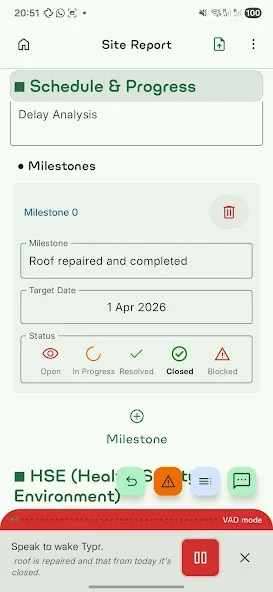
Don’t waste time typing on a small screen. Choose a template, dictate your notes, or simply have a conversation with our AI assistant to instantly fill in the details based on context. Need to pull data from a meeting? Pre-fill templates directly from audio transcriptions.
Why Choose Typr?
▸ Gain Hours Back in the Field: Perfect for real estate agents, construction managers, sales reps, and field service workers who need to draft and execute documents without returning to the office.
‣ AI-Powered Form Filling: Talk to Typr like an assistant. Our conversational AI extracts the right context from your voice and maps it perfectly to your template fields.
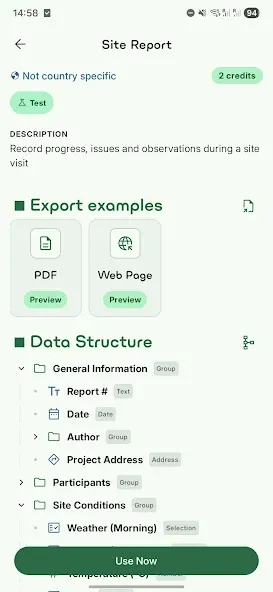
▸ Industry-Specific Templates: Access ready-to-use, professional templates tailored for specialized industries, ensuring you meet legal, tax, and corporate requirements immediately.
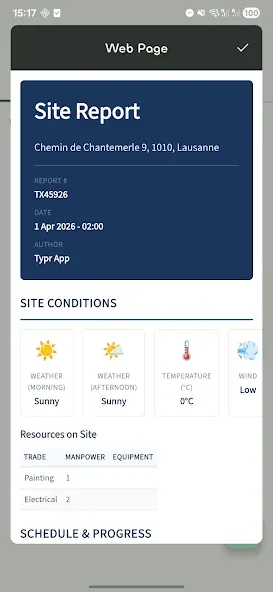
▸ Custom Company Formatting: Ensure every output looks concrete, professional, and perfectly aligned with your company’s branding and compliance needs.
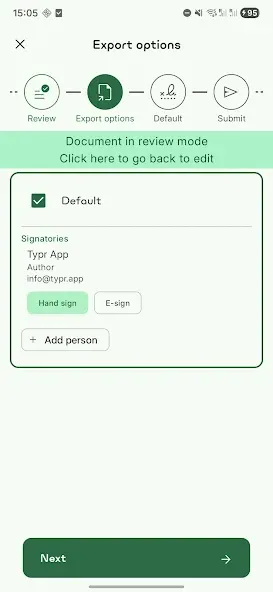
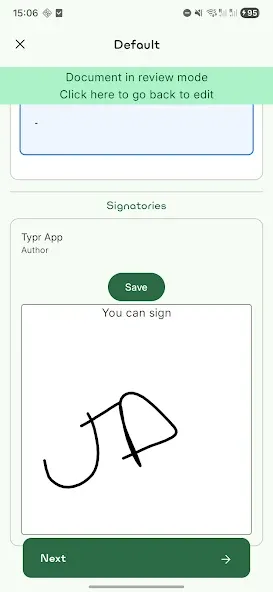
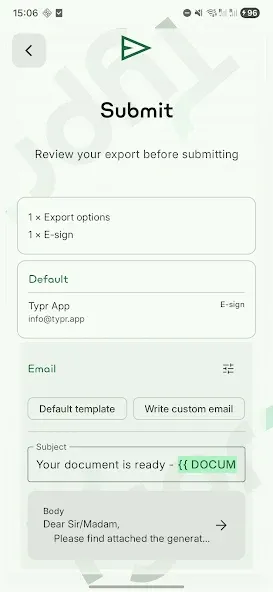
▸ Sign on the Spot or Request eSignature: Review the fully formatted PDF preview, capture a signature right on your screen, or send it out for a legally binding e-signature in one tap.
▸ True Mobile-First Workflow: Do everything on your phone that used to require a desktop setup, word processor, and scanner.
Core Features at a Glance
▸ Voice-to-text and AI conversational document filling
▸ Pre-fill from audio transcriptions
▸ Live PDF preview and formatting
▸ On-device signature capture & external e-signature routing
▸ Custom and industry-standard template library
▸ Seamless export and sharing
Google Play
APP STORE
Advertisement
Taptostore.com is an independent app discovery and editorial review platform. We publish reviews, comparisons, and recommendations designed to help users explore apps and make informed choices.
Download links on Taptostore.com direct users to the relevant official app store or another distribution channel designated by the developer or publisher. App downloads and installations take place through those external platforms.
Our content is developed through product research, editorial analysis, publicly available information, and, where appropriate, an assessment of the app’s features and user experience. Reviews and recommendations represent our editorial judgment at the time of publication.
The security and privacy practices of each app are determined by its developer. Before installing an app, users should review its official store listing, developer information, requested permissions, privacy policy, update history, and recent user feedback.
Taptostore.com does not control or independently certify third-party apps and cannot guarantee their security, reliability, performance, or privacy practices.
Not necessarily. Apps may be free, paid, advertising-supported, or include in-app purchases and recurring subscriptions. Pricing and availability may vary by region, device, platform, and time. Please refer to the relevant official store listing for current terms.
Availability may be affected by geographic restrictions, device compatibility, operating-system requirements, age limitations, store policies, or decisions made by the developer or publisher. These factors are outside the control of Taptostore.com.
Taptostore.com does not operate the apps featured on the website and cannot access their accounts or internal systems. Questions about login credentials, account recovery, technical issues, data deletion, or app functionality should be directed to the relevant developer through its official support channels.
Please do not send passwords, verification codes, recovery credentials, or payment information to Taptostore.com.
App-related payments, subscriptions, cancellations, and refunds are administered by the app store, developer, or payment provider responsible for the transaction. Taptostore.com does not process these transactions and cannot manage subscriptions or issue refunds.
Uninstalling an app may not cancel an active subscription. Users should manage subscriptions through the platform on which the purchase was made.
We make reasonable efforts to publish accurate and useful information. However, app features, pricing, compatibility, availability, and policies may change without notice. For the most current details, users should consult the relevant official store listing or developer documentation.
Unless expressly stated, Taptostore.com is not affiliated with, sponsored by, endorsed by, or officially connected with the developers, publishers, brands, or platforms featured on the website.
Product names, logos, brands, and trademarks belong to their respective owners and are referenced solely for identification and informational purposes.
Advertisement














