 LEGO® Builder: 3D Instructions
4.8


Photography
Ratings
Downloads
Age
Advertisement
Advertisement
This is a modern camera app focused on privacy and security. It includes modes for capturing images, videos and QR / barcode scanning along with additional modes based on CameraX vendor extensions (Portrait, HDR, Night, Face Retouch and Auto) on devices where they’re available.
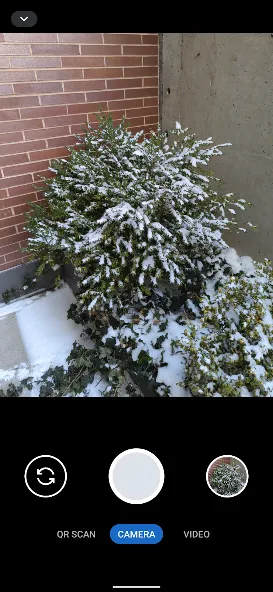
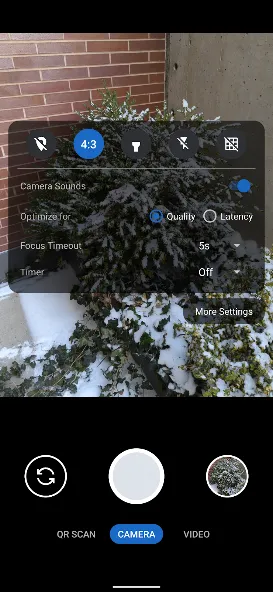
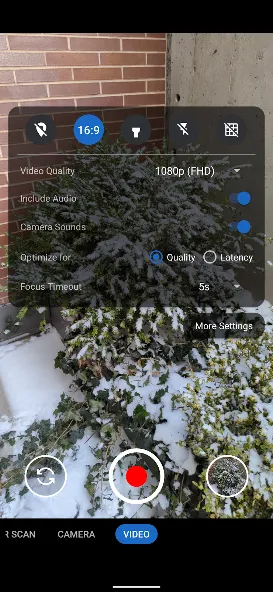
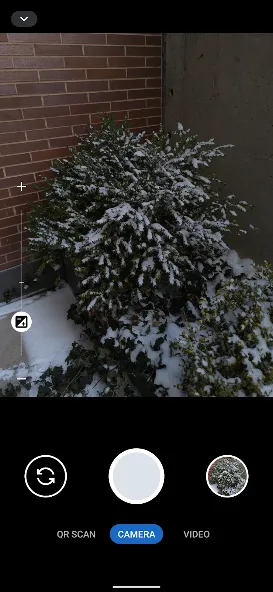
Modes are displayed as tabs at the bottom of the screen. You can switch between modes using the tab interface or by swiping left/right anywhere on the screen. The arrow button at the top opens the settings panel and you can close it by pressing anywhere outside the settings panel. You can also swipe down to open the settings and swipe up to close it. Outside of the QR scanning mode, there’s a row of large buttons above the tab bar for switching between the cameras (left), capturing images and starting/stopping video recording (middle) and opening the gallery (right). The volume keys can also be used as an equivalent to pressing the capture button. While recording a video, the gallery button becomes an image capture button for capturing images.
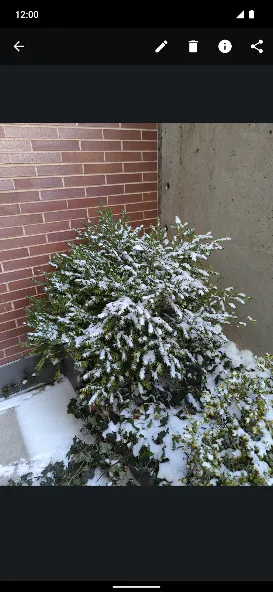
The app has an in-app gallery and video player for images/videos taken with it. It currently opens an external editor activity for the edit action.
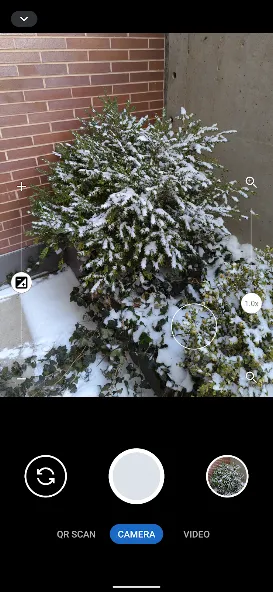
Zooming via pinch to zoom or the zoom slider will automatically make use of the wide angle and telephoto cameras on Pixels and other devices supporting it. It will become more broadly supported over time.
By default, continuous auto focus, auto exposure and auto white balance are used across the whole scene. Tapping to focus will switch to auto focus, auto exposure and auto white balance based on that location. The focus timeout setting determines the timeout before it switches back the default mode. The exposure compensation slider on the left allows manually tuning exposure and will automatically adjust shutter speed, aperture and ISO. Further configuration / tuning will be provided in the future.
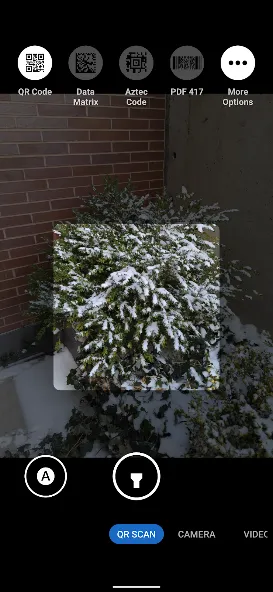
The QR scanning mode only scans within the scanning square marked on the screen. The QR code should be aligned with the edges of the square but can have any 90 degree orientation. Non-standard inverted QR codes are fully supported. It’s a very quick and high quality QR scanner able to easily scan very high density QR codes from Pixels. Every 2 seconds, it will refresh auto focus, auto exposure and auto white balance on the scanning square. It has full support for zooming in and out. The torch can be toggled with the button at the bottom center. The auto toggle at the bottom left can be used to toggle scanning for all supported barcode types. Alternatively, you can select which barcode types it should scan via the menu at the top. It only scans QR codes by default since that provides quick and reliable scanning. Most other types of barcodes can result in false positives. Each enabled type will slow down the scanning and will make it more prone to false positives especially with difficult to scan barcodes such as a dense QR code.
Camera permission is the only one that’s required. Images and videos are stored via the Media Store API so media/storage permissions aren’t required. The Microphone permission is needed for video recording by default but not when including audio is disabled. Location permission is only needed if you explicitly enabling location tagging, which is an experimental feature.
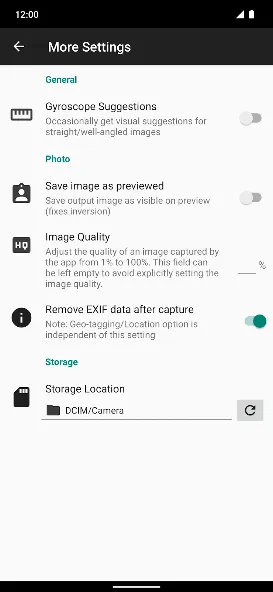
By default, EXIF metadata is stripped for captured images and only includes the orientation. Stripping metadata for videos is planned but not supported yet. Orientation metadata isn’t stripped since it’s fully visible from how the image is displayed so it doesn’t count as hidden metadata and is needed for proper display. You can toggle off stripping EXIF metadata in the More Settings menu opened from the settings dialog. Disabling metadata stripping will leave timestamp, phone model, exposure configuration and other metadata. Location tagging is disabled by default and won’t be stripped if you enable it.
Google Play
APP STORE
Advertisement
Taptostore.com is an independent app discovery and editorial review platform. We publish reviews, comparisons, and recommendations designed to help users explore apps and make informed choices.
Download links on Taptostore.com direct users to the relevant official app store or another distribution channel designated by the developer or publisher. App downloads and installations take place through those external platforms.
Our content is developed through product research, editorial analysis, publicly available information, and, where appropriate, an assessment of the app’s features and user experience. Reviews and recommendations represent our editorial judgment at the time of publication.
The security and privacy practices of each app are determined by its developer. Before installing an app, users should review its official store listing, developer information, requested permissions, privacy policy, update history, and recent user feedback.
Taptostore.com does not control or independently certify third-party apps and cannot guarantee their security, reliability, performance, or privacy practices.
Not necessarily. Apps may be free, paid, advertising-supported, or include in-app purchases and recurring subscriptions. Pricing and availability may vary by region, device, platform, and time. Please refer to the relevant official store listing for current terms.
Availability may be affected by geographic restrictions, device compatibility, operating-system requirements, age limitations, store policies, or decisions made by the developer or publisher. These factors are outside the control of Taptostore.com.
Taptostore.com does not operate the apps featured on the website and cannot access their accounts or internal systems. Questions about login credentials, account recovery, technical issues, data deletion, or app functionality should be directed to the relevant developer through its official support channels.
Please do not send passwords, verification codes, recovery credentials, or payment information to Taptostore.com.
App-related payments, subscriptions, cancellations, and refunds are administered by the app store, developer, or payment provider responsible for the transaction. Taptostore.com does not process these transactions and cannot manage subscriptions or issue refunds.
Uninstalling an app may not cancel an active subscription. Users should manage subscriptions through the platform on which the purchase was made.
We make reasonable efforts to publish accurate and useful information. However, app features, pricing, compatibility, availability, and policies may change without notice. For the most current details, users should consult the relevant official store listing or developer documentation.
Unless expressly stated, Taptostore.com is not affiliated with, sponsored by, endorsed by, or officially connected with the developers, publishers, brands, or platforms featured on the website.
Product names, logos, brands, and trademarks belong to their respective owners and are referenced solely for identification and informational purposes.
Advertisement